We will need a backup virtual machine (backupvm) with a big /backup folder and an extra /var/log/pgbackrest folder for logs. Pgbackrest on this machine will run as pgbackrest user/group.
On the database servers (pg01 and pg02) we will also need a /var/log/pgbackrest folder but on this machine it will be owned by postgres user. We will also need a spool folder for asynchronous log archiving on both database servers. Since we already have everything in /app from patroni installation I will put spool in the /app/pgsql/pgbackrest-spool folder (also owned by postgres).
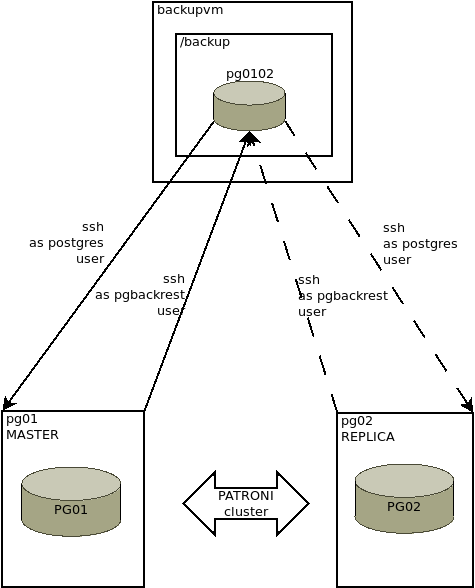
On backup machine:
$ sudo mkdir /var/log/pgbackrest
$ sudo chown pgbackrest.pgbackrest /var/log/pgbackrest
$ sudo chmod 750 /var/log/pgbackrest
Install pgbackrest on all three machines
$ sudo yum install pgbackrestOn all DB servers:
$ sudo mkdir /var/log/pgbackrest
$ sudo chown postgres.postgres /var/log/pgbackrest
$ sudo chmod 750 /var/log/pgbackrest
$ sudo mkdir -p /app/pgsql/pgbackrest-spool
$ sudo chown postgres.postgres /app/pgsql/pgbackrest-spool
$ sudo chmod 750 /app/pgsql/pgbackrest-spool
Edit configuration file on all three servers:
$ sudoedit /etc/pgbackrest.conf——->backupvm<———–
[pg0102]
pg1-host=pg01
pg1-path=/app/pgsql/13/data
pg2-host=pg02
pg2-path=/app/pgsql/13/data

[global]
repo1-path=/backup/pgbackrest
repo1-retention-full-type=count
repo1-retention-full=2
repo1-bundle=y
start-fast=y
process-max=4
backup-standby=y
log-path=/var/log/pgbackrest
——-> pg01<———–
[pg0102]
pg1-path=/app/pgsql/13/data

[global]
log-level-file=detail
log-path=/var/log/pgbackrest
repo1-host=backupvm
repo1-host-user=pgbackrest
archive-async=y
spool-path=/app/pgsql/pgbackrest-spool
archive-timeout=180
process-max=8

[global:archive-get]
process-max=4

[global:archive-push]
process-max=8
compress-type=bz2
——-> pg02<———–
[pg0102]
pg1-path=/app/pgsql/13/data

[global]
log-level-file=detail
log-path=/var/log/pgbackrest
repo1-host=backupvm
repo1-host-user=pgbackrest
archive-async=y
spool-path=/app/pgsql/pgbackrest-spool
archive-timeouot=180
process-max=8

[global:archive-get]
process-max=4

[global:archive-push]
process-max=8
compress-type=bz2
Create repository on backup host:
[pgbackrest@backupvm ~]$ pgbackrest --stanza=pg0102 --log-level-console=info stanza-create
2022-12-06 14:31:22.919 P00   INFO: stanza-create command begin 2.41: --exec-id=191188-303eb2c7 --log-level-console=info --log-path=/var/log/pgbackrest --pg1-host=pg01 --pg2-host=pg02 --pg1-path=/app/pgsql/13/data --pg2-path=/app/pgsql/13/data --pg1-socket-path=/app/pgsql/13/data --pg2-socket-path=/app/pgsql/13/data --repo1-path=/backup/pgbackrest --stanza=pg0102
2022-12-06 14:31:25.989 P00   INFO: stanza-create for stanza 'pg0102' on repo1
2022-12-06 14:31:26.209 P00   INFO: stanza-create command end: completed successfully (3292ms)
Adjust patroni config on DB hosts:
$ patronictl -c /etc/patroni.yml edit-config
## adjust the following lines
postgresql:
  parameters:
    archive_command: pgbackrest --stanza=pg0102 archive-push "%p"
    archive_mode: "on"

$ patronictl -c /etc/patroni.yml restart postgres
Check that the archiving system is working on master database host:
$ pgbackrest --stanza=pg0102 --log-level-console=info check
2022-12-06 14:58:06.653 P00   INFO: check command begin 2.41: --exec-id=871670-c772d656 --log-level-console=info --log-level-file=detail --log-path=/var/log/pgbackrest --pg1-path=/app/pgsql/13/data --pg1-socket-path=/app/pgsql/13/data --repo1-host=backupvm --repo1-host-user=pgbackrest --stanza=pg0102
2022-12-06 14:58:07.263 P00   INFO: check repo1 configuration (primary)
2022-12-06 14:58:08.034 P00   INFO: check repo1 archive for WAL (primary)
2022-12-06 14:58:08.750 P00   INFO: WAL segment 00000018000265A6000000D3 successfully archived to '/backup/pgbackrest/archive/pg0102/13-1/00000018000265A6/00000018000265A6000000D3-ea3d3593d1daf572ddc695944e62c9abe1bcad13.gz' on repo1
2022-12-06 14:58:08.851 P00   INFO: check command end: completed successfully (2199ms)
From now on your master database will keep its WAL files in pg_wal folder until replica applies them but then they will be pushed/archived to the backup server freeing up space in your pg_wal directory. This will make your /backup folder on backupvm grow until you do enough full backups for the expiry process to clean them up (expiry goes after each full backup).
Do a backup on backup host as pgbackrest user to have the base for restoring:
[pgbackrest@backupvm ~]$ pgbackrest --stanza=pg0102 --log-level-console=info backup --type=fullCheck info on backups on any DB host as postgres user:
$ pgbackrest --stanza=pg0102 --log-level-console=info info
stanza: pg0102
    status: ok
    cipher: none

    db (current)
        wal archive min/max (13): 00000018000265A6000000CF/00000018000265A6000000FF

        full backup: 20221206-150150F
            timestamp start/stop: 2022-12-06 15:01:50 / 2022-12-06 17:56:34
            wal start/stop: 00000018000265A6000000D5 / 00000018000265A6000000D5
            database size: 787.6GB, database backup size: 787.6GB
            repo1: backup set size: 28.2GB, backup size: 28.2GB

        incr backup: 20221206-150150F_20221207-085800I
            timestamp start/stop: 2022-12-07 08:58:00 / 2022-12-07 09:06:54
            wal start/stop: 00000018000265A6000000EC / 00000018000265A6000000EC
            database size: 787.6GB, database backup size: 51.3GB
            repo1: backup set size: 28.2GB, backup size: 664.5MB
            backup reference list: 20221206-150150F
While the backup is going this info command will display current percentage of the backup process under status filed.
Update patroni again for recovery.conf section on database server so that replica can pull WAL files from backup if it needs them for recovery:
$ patronictl -c /etc/patroni.yml edit-config
## adjust the following lines
loop_wait: 10
maximum_lag_on_failover: 1048576
postgresql:
  parameters:
    archive_command: pgbackrest --stanza=pg0102 archive-push "%p"
    archive_mode: 'on'
  recovery_conf:
    recovery_target_timeline: latest
    restore_command: pgbackrest --stanza=pg0102 archive-get %f "%p"
  use_slots: true
retry_timeout: 10
ttl: 30

$ patronictl -c /etc/patroni.yml reload postgres
To use pgBackRest for creating (or re-initializing) replicas, we need to adjust the Patroni configuration file.
On all your nodes, in /etc/patroni.yml, find the following part (example only):
postgresql:
  listen: "0.0.0.0:5432"
  connect_address: "$MY_IP:5432"
  data_dir: /var/lib/pgsql/13/data
  bin_dir: /usr/pgsql-13/bin
  pgpass: /tmp/pgpass0
  authentication:
    replication:
      username: replicator
      password: confidential
    superuser:
      username: postgres
      password: my-super-password
    rewind:
      username: rewind_user
      password: rewind_password
  parameters:
    unix_socket_directories: '/var/run/postgresql,/tmp'
and add:
  create_replica_methods:
    - pgbackrest
    - basebackup
  pgbackrest:
    command: pgbackrest --stanza=pg0102 restore --delta --type=none
    keep_data: True
    no_params: True
  basebackup:
    checkpoint: 'fast'
Don’t forget to reload the configuration:
$ sudo su - postgres
$ ps -ef | grep patroni
...
$ kill -HUP <patroni_PID>
And now if you do a patronictl -c /etc/patroni.yml reinit postgres pg02 it will use a backup from backup server and WAL files that were archived to the backup server to reinitialize it (doing it much faster since it uses parallel processes).
Don’t forget to schedule regular full backups of databases on your backupvm using cron or similar tool.